Qualz.ai
Pre-interview Onboarding Experience for AI-moderated Interview
CLIENT
INDUSTRY
Qualz.ai
Qualitative Research. AI. B2B Saas
My Role
Lead UX Desineger
Responsibilties
Solo Designer
Team
4
Timeline
3 days
Tools
Figma,Polymat.ai
OVERVIEW
What is Qualz.ai?
Qualz.ai is an early start-up that analyzes qualitative data through AI and generates actionable insights. It helps researchers conduct and analyze AI-moderated interviews by automating transcription, summarization, and thematic analysis in real time.
Users
Research Participants
Non-technical users invited to interviews via email link. They arrive with no context about the platform, no prior setup experience, and varying levels of technical confidence.
Researchers
The buyers and operators of Qualz.ai. They configure sessions, send participant links, and depend on clean, uninterrupted data; any mid-session technical issue directly impacts their work.
Problem
User Problem
Research participants felt overwhelmed when interviews began without a proper setup process. They weren't sure whether their audio/video was working or whether they could turn off the camera for privacy.
Business Problem
These interruptions affected data quality and session efficiency; researchers had to restart or troubleshoot live calls, wasting valuable AI processing time.
DESIGN CHALLENGE
How might we help research participants feel confident, prepared, and technically ready before an AI-moderated interview begins, without adding friction to the researcher's workflow or increasing dropoff?
Solution
I designed a pre-interview onboarding experience that gives participants a moment to confirm devices, resolve errors, and join with confidence without adding friction to the researcher's workflow.

Prototype demo- pre-interview onboarding flow covering device check, browser permissions, and error states
Interview Flow Before
The participant receives a link via email, fills in their email and access code and begins the Interview
The AI starts asking questions straight away — no setup moment, no device check, no chance for the participant to confirm their mic or camera was working.
RESEARCH
Key Observations from Competitors
I observed Zoom, Microsoft Teams, and Google Meet, focusing on how they onboard participants before an Interview begins.
Pre-Session Setup
A preview screen before entry with a live camera feed, device selectors, and mic/camera toggles.
OS-level Error Handling
Each platform guides participants to fix blocked device permissions at the browser or system level.
Device Testing
In-screen audio and video testing so participants can confirm devices are working before joining.
Participant Control Over Camera
Participants can toggle the camera on or off before entering. The camera is optional, not mandatory.
WHAT WAS MISSING IN QUALZ?
Qualz lacked every foundational pattern competitors had validated: no pre-session setup moment, no camera preview, no device selectors, no testing options, and no guidance for system or browser-level failures.
Identifying Key Edge Cases
Researchers could configure sessions as audio-only or audio and video. I identified key edge cases for both gently reinforcing camera use when required, while guiding all participants through system and browser permission issues.
Mode
Video-Enabled Interview
Researcher requirement
Camera + microphone required for a succesful session.
Key edge cases
-
Participants hesistant to turn on a camera
-
Browser or OS permission blocked
-
Wrong camera or microphone selected
-
Device not detected or input switching needed
Mode
Voice-only Interview
Researcher requirement
Microphone required; video stays optional.
Key edge cases
-
Microphone disabled at system or browser level
-
Wrong device input selected
DESIGN DECISIONS
Feature #1
Pre-setup Screen
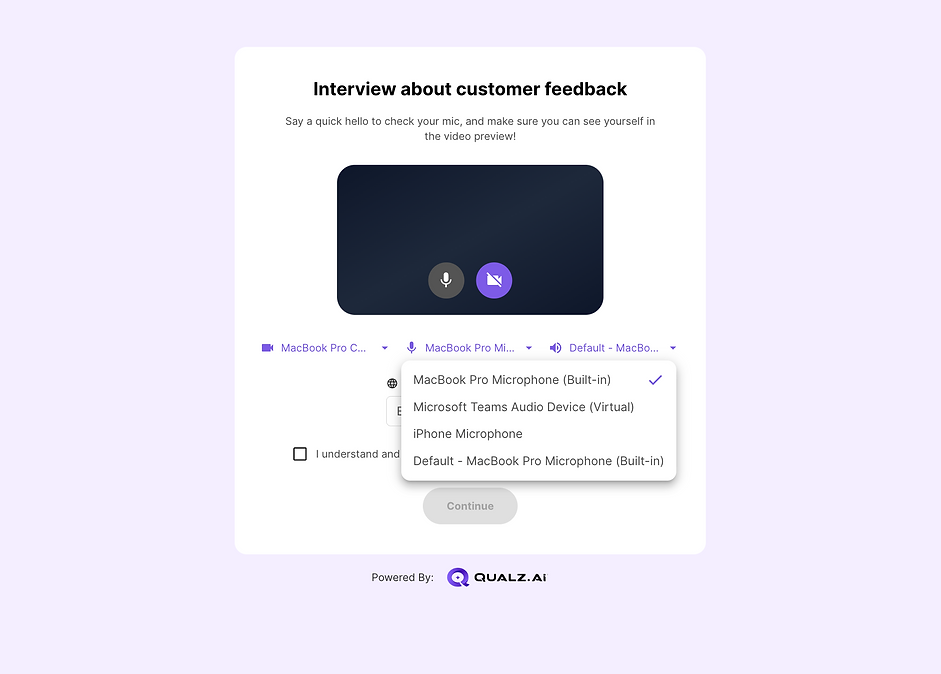
I introduced a pre-session setup screen that allows participants to confirm their camera status, adjust microphone settings, test speaker output, and switch between available devices before entering the interview. This pre-setup creates a dedicated moment for participants to identify and resolve technical issues.

Camera preview. Device Selectors.

Feature #4
Voluntary Device Off
We identified that participants could voluntarily turn off their camera or microphone even after access had been granted, creating a silent failure state that would disrupt the interview. We introduced a modal that surfaces this issue without being forceful, while ensuring participants cannot proceed until both devices are confirmed active based on the researcher's configuration.

"Your microphone is turned off" - non-forceful, but the participant cannot proceed until resolve
Design Handover & Stakeholder Alignment
WITH DEVELOPER
Mid-fi designs were presented to the development team. We explored the hi-fi interfaces together using Polymat.ai, aligning on the design system before building. The final designs were presented to stakeholders.
STAKEHOLDER FEEDBACK
The design direction was approved. The project was structured to move fast, and the stakeholders trusted the process
Impact & Result
Launched immediately, it established a reliable foundation for participant experience while keeping up with early-stage startup speed.
Using LLM capabilities and validated competitor patterns accelerated development. This reduced the back-and-forth between the developer and stakeholders. Reduced rework and freed the team to focus on higher-impact priorities.